
FlowModels gives you access to models from several providers with a single key and shared credit. You can see which models are enabled and what they cost your team under Models. The page shows the same models and prices your application gets through the API.
The model list
Open Models in the dashboard. The Models and prices table shows the following for each enabled model:
- Model ID: the full identifier made up of provider and model, for example
anthropic/claude-sonnet-5-5. This is exactly the value you send in themodelfield of your request. Understanding model IDs explains the format. - Kind: for example Chat for text and dialog models, Embedding for models that turn text into number vectors, and Video and Image for models that generate videos or images.
- Input / 1M tokens and Output / 1M tokens: the price in euros for one million tokens that you send or that the model returns. For video and image models, this shows the price per second or per image instead, as a range if there are several variants.
- Context: how many tokens the model can process in total. With Not specified, the provider doesn't state this.
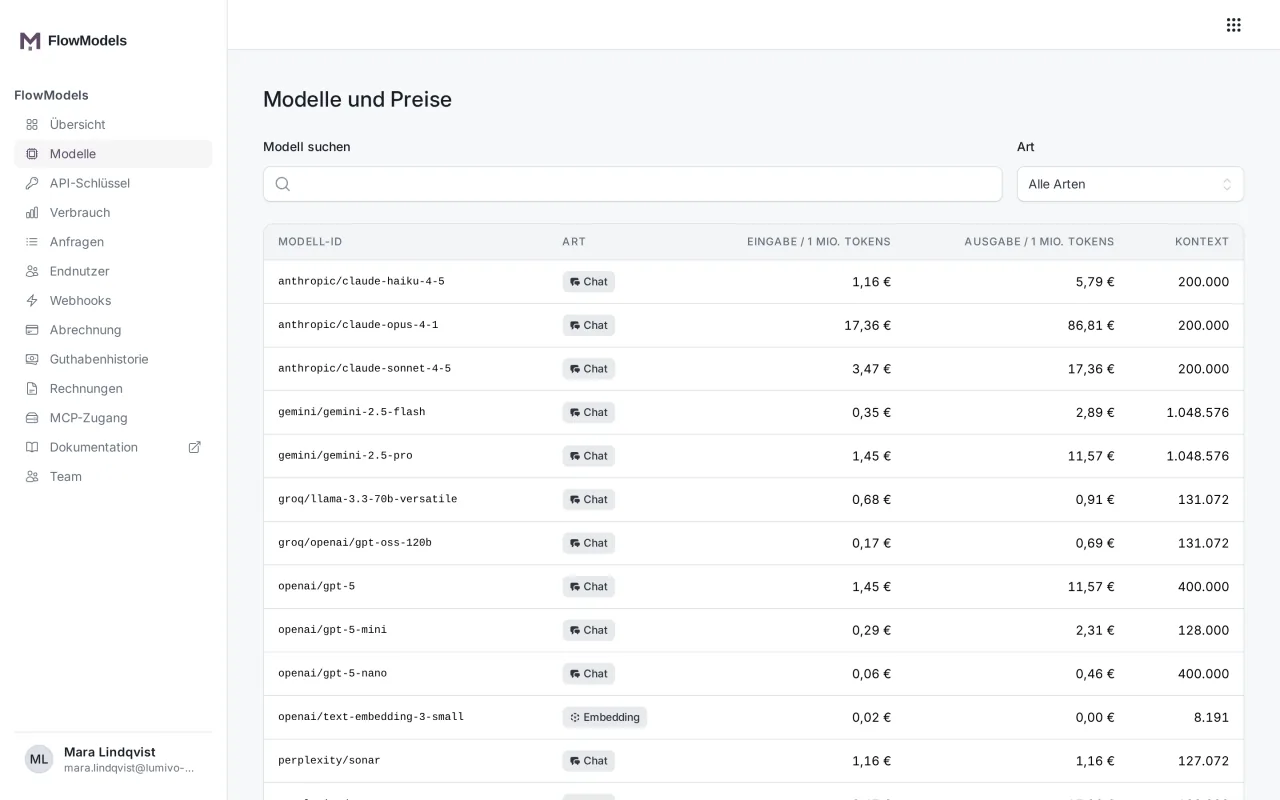
Search model narrows the list by name, and Kind shows only embedding models, for example.
How the prices come about
The prices shown apply to your team and are converted to euros at the current exchange rate. The display is rounded to two decimal places. Billing uses the unrounded price and the exchange rate recorded at the time of the call. No additional taxes are added.
In addition to input and output, other services may be billed, such as caching or a web search. You can see what an individual call actually cost in the request log and in the API response in the usage field.
Video and image models
Video and image models aren't billed by tokens:
- Videos have a price per second. It depends on the model, the resolution, the sound and, for some models, the thinking mode. The full length is reserved when the job starts, and the amount is only charged once the finished video has been delivered.
- Images have a price per image. It depends on the model, the format and the quality. The amount is only charged once the image is stored.
Because these amounts can be very small, the model list shows them with four decimal places. Generate videos and Generate and edit images explain how to create videos and images.
Query models in your application
Your application can fetch the list with GET /v1/models. For each model, you also get which parameters it supports, for example whether it accepts tools, images or a reasoning level. You can recognize video and image models by kind with video or image, and their prices are under pricing.variants with the unit per_second or per_image. If you send a parameter the chosen model doesn't know, the API rejects the request with 400 unsupported_for_model instead of silently dropping it.
When a model is retired
A model that is due to be switched off gets a cutoff date. Until then, it stays in the list and is fully usable. The responses then also carry the Deprecation and Sunset headers with the date. From that date on, the API responds with 410 model_deprecated. So check from time to time whether your application uses a model that will soon go away, and switch in good time.
If something goes wrong
- Prices currently unavailable: The euro prices can't be calculated reliably at the moment, usually because the current exchange rate is missing. Try again later. Your application gets
503 pricing_unavailablein this case. - A model is missing: The list contains only models that are enabled and have complete prices. A model that doesn't appear here can't be called by your application either.