
With FlowModels, you can generate short videos from a text description or from a start image. A video is created in the background: you start a job, we reserve the amount, and as soon as the video is ready, you can play or download it. You can do this in the Playground in the dashboard or directly through the API.
The models
| Model | Input | Duration | Resolution | Sound |
|---|---|---|---|---|
bytedance/seedance-2.5/text-to-video |
prompt | 4 to 30 seconds | 480p, 720p, 1080p |
yes |
bytedance/seedance-2.5/image-to-video |
start image, prompt optional | 4 to 30 seconds | 480p, 720p, 1080p |
yes |
minimax/h3/text-to-video |
prompt | 5 to 15 seconds | 2K |
no |
minimax/h3/image-to-video |
start image and prompt | 5 to 15 seconds | 2K |
no |
alibaba/wan-3.0/text-to-video |
prompt | 2 to 30 seconds | 480p, 720p, 1080p |
yes |
alibaba/wan-3.0/image-to-video |
start image and prompt | 2 to 30 seconds | 480p, 720p, 1080p |
yes |
All image-to-video models also accept an end image. Only use models that appear with the kind video in your response from GET /v1/models. There, video lists the allowed values per model and pricing.variants the prices per second. There's no automatic switch to another model.
In the Playground
Open the Playground in the dashboard and switch to the Videos tab. Choose a Model, describe the scene in the Prompt field and set Duration in seconds and Resolution. Depending on the model, Aspect ratio, Output format, Generate sound, Thinking mode, Add AI watermark or Seed (optional) are added. For image to video, you upload a Start image and, if you like, an End image (JPEG, PNG, WebP or GIF, up to 10 MB).
Before you start, Reservation shows the amount set aside for your selection and the price per second. Generate video starts the job.
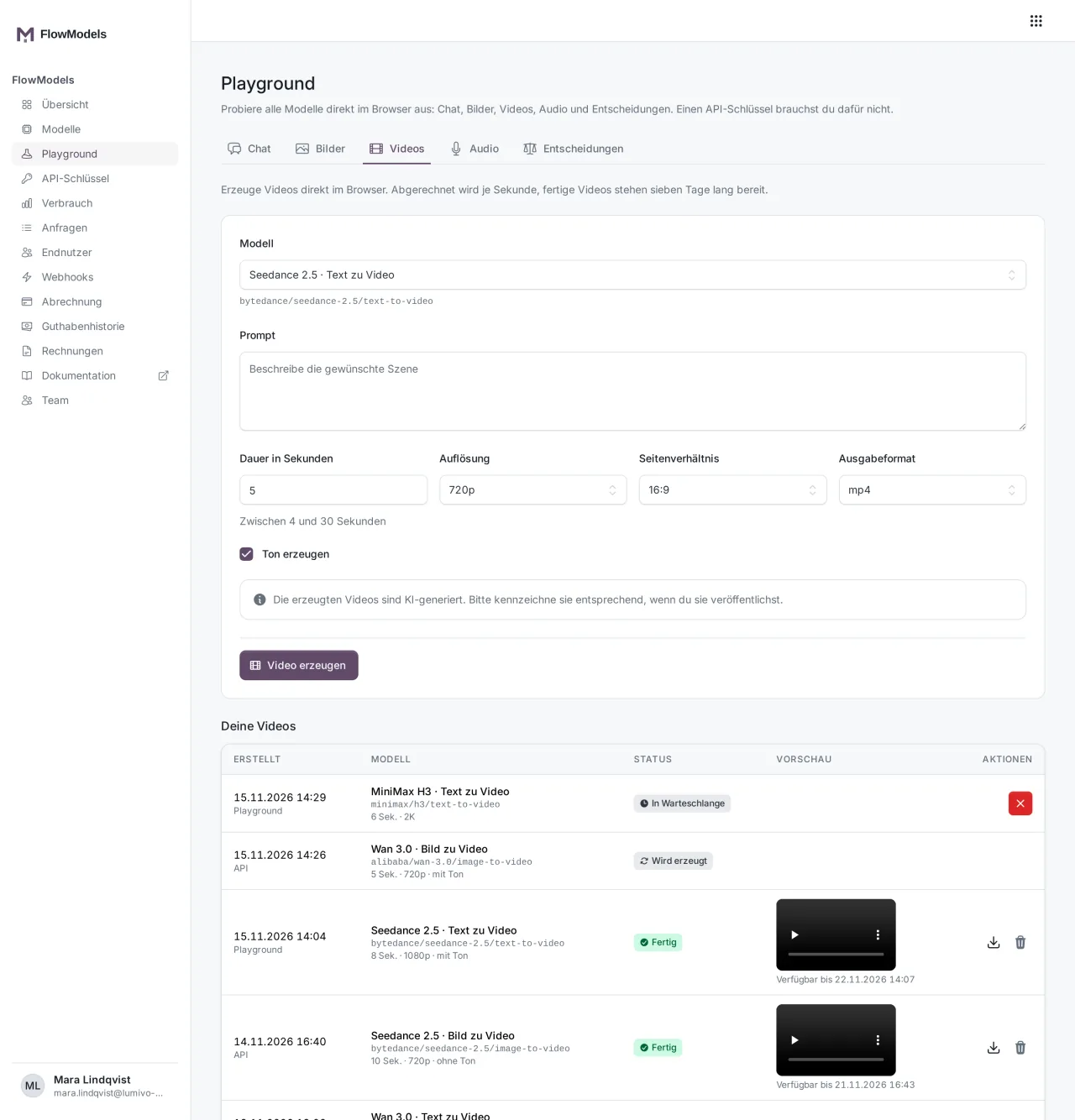
Your videos lists all videos of your team, including the ones started through the API. While a video is running, the list refreshes on its own. You can play finished videos right there or download them, cancel a video that is still waiting and delete a finished one. The list doesn't show prompts because the whole team can see it. Billing runs through your team's FlowModels credit, so you don't need an API key for this. In Usage and Requests, your calls appear as "Playground · your name".
What the other Playground tabs can do and which limits apply there is explained in Try models in the Playground.
Via the API
Send the job to POST /v1/videos:
curl https://api.flowmodels.one/v1/videos \
  -H "Authorization: Bearer at_your_key" \
  -H "Content-Type: application/json" \
  -H "Idempotency-Key: video-summer-campaign-01" \
  -d '{"model": "bytedance/seedance-2.5/text-to-video", "prompt": "A paper boat on a calm lake at sunrise", "duration": 5, "resolution": "720p"}'
The API responds right away with HTTP 202 and a job with an id and status queued. With the same Idempotency-Key, you can safely repeat the request after a network error, and no second video is created.
The most important fields:
modelandprompt: The prompt is required for all text-to-video models and for MiniMax and Wan image to video, with up to 7,000 characters.image_urlorimage_file_id: the start image as anhttpsaddress, as adata:URL or as a file ID fromPOST /v1/files. For the end image, there areend_image_urlandend_image_file_id.duration,resolution,aspect_ratio: duration in seconds (default 5), resolution and aspect ratio within the range of the model. Seedance image to video follows the aspect ratio of the image.generate_audio(Seedance and Wan),output_formatwithmp4ormov(Seedance text to video only),enable_thinkingandseed(Wan only),aigc_watermark(MiniMax only).
If the model doesn't know a field, the API rejects it with 422 and the field name in param before anything is reserved.
Status and retrieval
- Query the job with
GET /v1/videos/{id}, at most every five seconds. Alternatively, a webhook reports the eventsvideo.completed,video.failedandvideo.cancelled, see Set up FlowModels webhooks. statusisqueuedfirst, thenin_progress, and finallycompleted,failedorcancelled.- Once the video is ready, the response contains
content_url,content_typeandsize_bytes.GET /v1/videos/{id}/contentresponds with a 302 to a download address that is valid for 15 minutes.
GET /v1/videos lists your team's jobs, and you can page and filter with limit, after and status.
With POST /v1/videos/{id}/cancel, you cancel a job as long as generation hasn't started yet, and the reservation is released. If it's already running, the API responds with 409 video_not_cancellable, and the video is completed and billed.
Retention
A finished video stays available for seven days after completion, and expires_at gives the exact time. After that, we delete the video and the job automatically. With DELETE /v1/videos/{id} or in the Playground, you delete a finished video earlier.
What a video costs
Videos are billed per second. The price depends on the model, the resolution, the sound and, for Wan, the thinking mode. You can see the current price under Models and in GET /v1/models under pricing.variants.
When the job starts, we fix the price and reserve the full requested length. The amount is only charged once the finished video is stored with us. Failed, rejected and cancelled jobs cost nothing. What was billed is shown in the finished job under usage.cost.
Limits
- How many videos your team can run at the same time depends on your request limit tier: 3, 5, 10 or 20. See Request limit: how the tiers work.
- Start and end images can be up to 10 MiB.
- The generated videos are AI generated. Label them accordingly when you publish them.
If something goes wrong
422 invalid_video_request: A field doesn't fit the model, andparamnames it.422 video_input_invalid: The image is missing, invalid, too large or doesn't belong to your team.429 insufficient_quotaor429 spend_limit_exceeded: Your credit or spending limit isn't enough for the reservation.429 video_concurrency_exceeded: Too many videos are already running. Wait for the time inRetry-After.503 video_model_unavailable,503 video_pricing_unavailableor503 video_provider_unavailable: Try again later, your credit wasn't charged.404 video_not_found: The ID is unknown or doesn't belong to your team.409 video_not_readyor409 video_not_deletable: The current status doesn't allow the action yet.- Job
failed:error.codegives the reason, for examplevideo_generation_failedorvideo_content_rejected. In rare cases, such asvideo_submit_uncertain, the amount stays reserved until we have checked the case.