
With FlowModels, you pay for each request individually based on usage. What a request cost is shown directly in its response and in the request log. Here's how to read the amount, why more is sometimes set aside up front than is billed at the end, and which services cost extra on top of input and output.
The costs in the response
Every billable response contains the usage block:
"usage": {
  "prompt_tokens": 42,
  "completion_tokens": 24,
  "total_tokens": 66,
  "cost": "0.000090",
  "currency": "EUR"
}
cost is the amount in euros that we bill for this request, as a decimal number in text form. Process it in your code as text or a decimal type, not as a float, so that no rounding errors creep in when you add things up. For streamed responses, usage is in the last chunk.
Elsewhere in the API, such as with GET /credits or GET /usage, amounts are in micro-euros, so as whole numbers. One million micro-euros equal one euro.
Costs in the request log
Under Requests, you'll find each individual request with Time, Key, Model, Status, Tokens and Cost. Show details also shows Actual model, Provider, Duration, Prompt tokens and Completion tokens. Check individual requests in the request log explains how to filter the log.
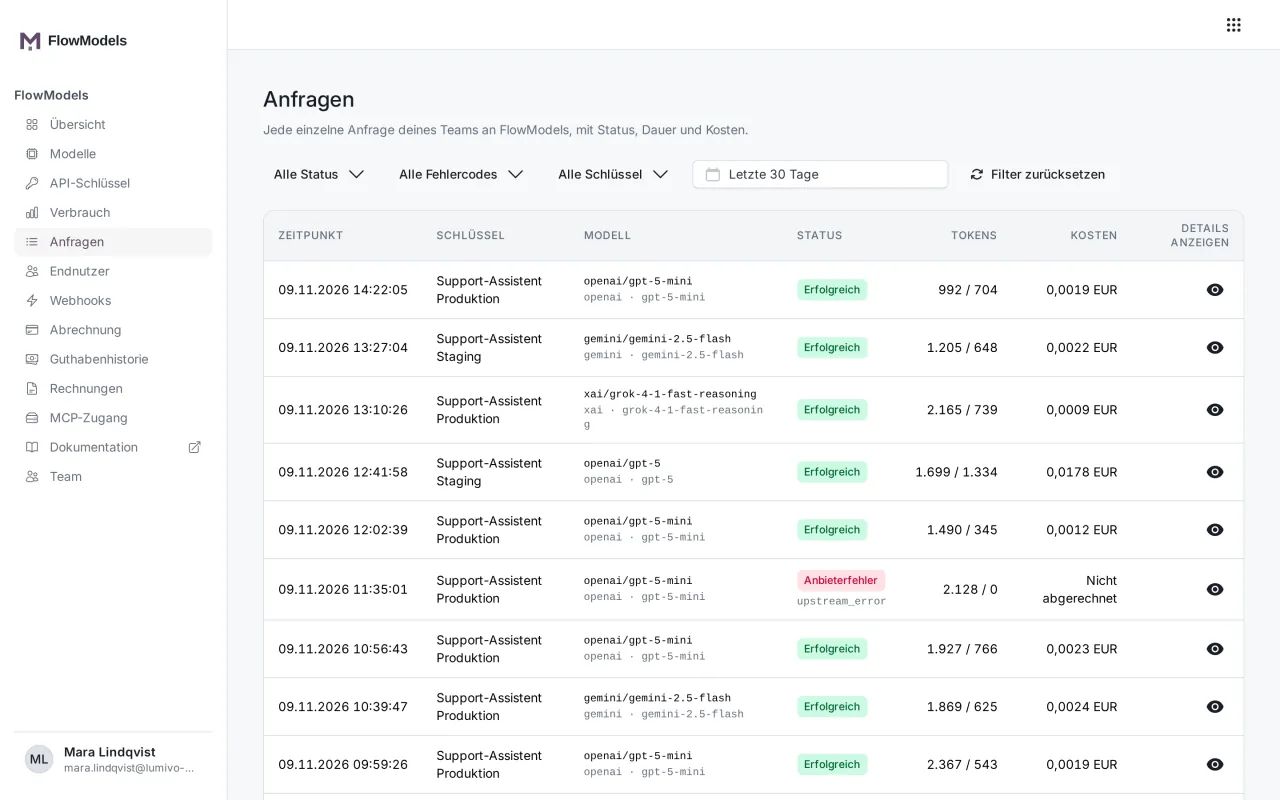
Reservation and billing
Before we send a request to the provider, we set aside an estimated maximum amount from your credit. That's the reservation. After the response, we bill the actual usage and release the rest immediately. That's why you sometimes see an amount under Open reservations in the Overview while calls are running.
Everything that was needed for the response is billed, including conversation context from the Brain, searches in end-user files and necessary summaries.
If there is no reliable price for a request, we don't estimate, we reject it, for example with 503 pricing_unavailable. A model without a maintained price doesn't appear in the model list at all.
Videos and images
Videos and images aren't billed by tokens. Their usage therefore shows 0 tokens, plus seconds or images.
- Videos are billed per second. When the job starts, we reserve the full requested length. The amount is only charged once the finished video is stored with us. Until then, it appears under Open reservations, even if that takes several minutes.
- Images are billed per image. We reserve the price of one image and charge it as soon as the image is stored.
You can find more in Generate videos and Generate and edit images.
What costs extra
Besides input and output tokens, these services can be included in usage.cost:
- Web search: Each search is billed additionally, see Turn on web search, limit it to domains and read the sources.
- History compaction: With
context_compression: true, an additional model call summarizes your history. Its share is listed separately underusage.flowai.compression. - Audio in a message: If the model can't hear audio by itself, we transcribe it first and bill that additionally.
- Your own functions: A function call needs two requests, and both are billed.
- Memory search:
GET /memorieswithqueryis billed, simply listing them is not. - End-user files: There is currently no monthly fee for storage. Processing during upload, such as embeddings or image analysis, is billed as model usage.
What costs nothing
- Requests we reject with
429 rate_limit_exceededbecause of your request limit - Requests that already fail validation, for example with
400 unsupported_for_model, before anything is reserved - Retries with the same
Idempotency-Keywhose first request already succeeded, see Retry requests safely - Videos and images that fail or are rejected, and videos you cancel before generation starts
When the connection drops
If the connection drops during a request, the usage that accrued at the provider up to that point is billed. If you send it again, it's a new request with new costs.
Good to know
- The Overview sometimes shows notes such as "calls do not have a complete price yet" or "estimates are not billed and are not part of the spend". The affected calls are then not yet included in the month's Routing spend.
- You can see the totals by day, model, key or end user under Usage, see Analyze usage and export it as CSV.