
The models behind FlowModels are very different. Some can see images, some think longer, some don't accept temperature. So that you don't only find this out from an error message, the model list describes each model precisely. Here's what information you'll find and how to read it.
The model list in the interface
Under Models, you can see all enabled models with Kind, Model ID, the prices for Input / 1M tokens and Output / 1M tokens, and the Context, which is how many tokens the model can process in total. For video and image models, the price per second or per image appears instead of the token prices. FlowModels models and prices explains how to read the prices.
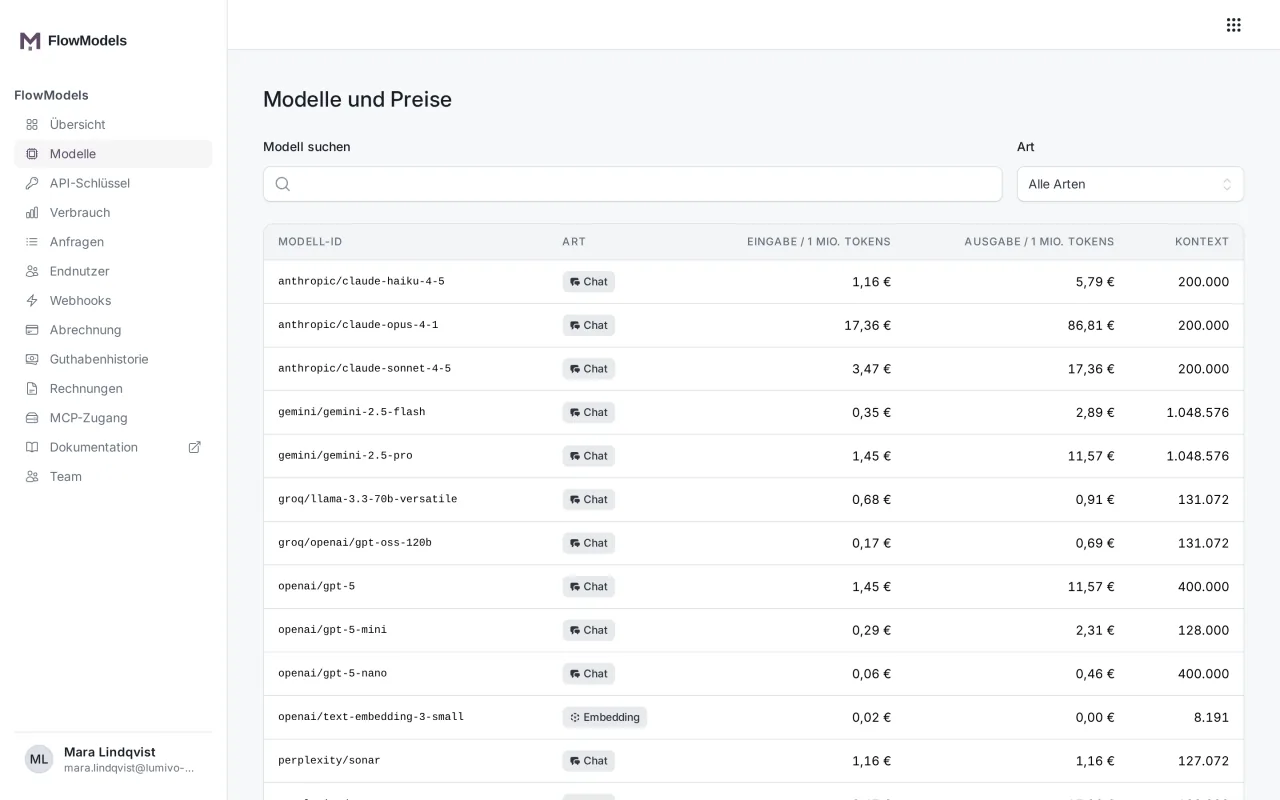
The interface doesn't show a model's capabilities. The API provides those.
The model list via API
GET /v1/models returns all the models your team can use. The list is paginated: if the response says has_more: true, fetch the next page with ?after= and the value from last_id. You can fetch a single model with GET /v1/models/groq/openai/gpt-oss-120b. The slashes in the identifier simply stay in place.
The most important fields of an entry:
kind: what the model is intended for, such aschat,embedding,audio,videoorimage. Only models withchatare allowed for/chat/completionsand/responses.context_length: the context window according to the providerflowai_limits: the limits that actually apply with us, includinginput_tokensandmax_output_tokenscapabilities: the model's capabilitiessupported_parameters: the request fields the model actually evaluatespricing: the prices in euros per million tokens, for video and image models per second or per image
If context_length and flowai_limits.input_tokens differ, the value from flowai_limits applies to your request. If it says null, no value is available. It never means "unlimited".
Video and image models
Video and image models don't describe what they can do through capabilities, but through a field of their own:
video: whether the model works from text or from a start image, the allowed duration, resolutions and aspect ratios, whether it generates sound and whether it accepts an end imageimage: the formats, the qualities and whether the model can edit an image
pricing.variants gives the price per second (per_second) or per image (per_image) for each combination. If an image model can edit, it also gives the price of an edit (per_image_edit). Videos are only billed after delivery, images only after they are stored. You use these models only through their own endpoints, not for chat. Details are in Generate videos and Generate and edit images.
Reading capabilities
capabilities lists features with true or false, for example:
| Field | Meaning |
|---|---|
vision |
The model can see images. |
tools, tool_choice, parallel_tool_calls |
The model can call your functions. |
json_object, json_schema |
The model returns JSON or JSON following a schema. |
web_search, web_search_forced |
The model can search the web or always searches. |
reasoning, reasoning_levels |
The model thinks before responding, and you can choose these levels. |
sampling |
The model accepts fields such as temperature and top_p. |
streaming |
The model can stream its response. |
If you send a field that's missing from supported_parameters, the API rejects the request with 400 unsupported_for_model instead of silently ignoring the field. The classic example is temperature on a model with fixed sampling. The raw provider data is also in provider_metadata. It's structured differently per provider and isn't a guarantee.
Output length: max_tokens
With max_tokens (on /responses the field is called max_output_tokens), you limit the length of the response. Allowed values are 1 to 128,000.
- If you leave out the field, the model's maximum applies. If no maximum is stored for a model, it's 4,096 tokens.
- A value above the model's maximum is rejected with
400 invalid_field_value. The error message states the maximum. - OpenAI models need at least 16 tokens.
Reasoning effort: reasoning_effort
Models with reasoning think before responding. You control how thoroughly with reasoning_effort, on /responses with reasoning.effort. Possible levels are none, minimal, low, medium, high, xhigh and max. Which of these a model accepts is shown in capabilities.reasoning_levels. Without a value, the provider's default applies. More reasoning usually means better answers for difficult tasks, but also more tokens and therefore higher costs.
Limits of a single request
Every request also has fixed upper limits: at most 4 MiB of JSON, 1,000 messages, 1,000,000 characters per message and 128 functions in tools. You'll also find them in flowai_limits and in GET /v1/key. Request limit: how the tiers work explains how many requests you can send per minute.
If something goes wrong
404 model_not_found: The identifier doesn't exist, or there's currently no price stored for the model. Compare it with the current list.400 unsupported_for_modelwithparammodel: You used a model of a different kind, for example an embedding model for a chat.410 model_deprecated: The model has been retired. TheDeprecationandSunsetheaders announce this ahead of time. Details are in FlowModels models and prices.